16 Spring对事务的支持
16.1 事务概述
- 什么是事务
- 在一个业务流程当中,通常需要多条 DML(insert delete update)语句共同联合才能完成,这多条 DML 语句必须同时成功,或者同时失败,这样才能保证数据的安全。
- 多条 DML 要么同时成功,要么同时失败,这叫做事务。
- 事务:
Transaction(tx)
- 事务的四个处理过程:
- 第一步:开启事务 (start transaction)
- 第二步:执行核心业务代码
- 第三步:提交事务(如果核心业务处理过程中没有出现异常)(commit transaction)
- 第四步:回滚事务(如果核心业务处理过程中出现异常)(rollback transaction)
- 事务的四个特性:
- A 原子性:事务是最小的工作单元,不可再分。
- C 一致性:事务要求要么同时成功,要么同时失败。事务前和事务后的总量不变。
- I 隔离性:事务和事务之间因为有隔离性,才可以保证互不干扰。
- D 持久性:持久性是事务结束的标志。
16.2 引入事务场景
以银行账户转账为例学习事务。两个账户 act-001 和 act-002。act-001 账户向 act-002 账户转账 10000,必须同时成功,或者同时失败。(一个减成功,一个加成功,这两条 update 语句必须同时成功,或同时失败。)
连接数据库的技术采用 Spring 框架的 JdbcTemplate。
采用三层架构搭建: ![[16.02-1.png]]
模块名:spring 6-013-tx-bank(依赖如下) ```XML title:pom.xml
<groupId>com.powernode</groupId>
<artifactId>spring6-013-tx-bank</artifactId>
<version>1.0-SNAPSHOT</version>
<packaging>jar</packaging>

<!--仓库-->
<repositories>
    <!--spring里程碑版本的仓库-->
    <repository>
        <id>repository.spring.milestone</id>
        <name>Spring Milestone Repository</name>
        <url>https://repo.spring.io/milestone</url>
    </repository>
</repositories>

<!--依赖-->
<dependencies>
    <!--spring context-->
    <dependency>
        <groupId>org.springframework</groupId>
        <artifactId>spring-context</artifactId>
        <version>6.0.0-M2</version>
    </dependency>
    <!--spring jdbc-->
    <dependency>
        <groupId>org.springframework</groupId>
        <artifactId>spring-jdbc</artifactId>
        <version>6.0.0-M2</version>
    </dependency>
    <!--mysql驱动-->
    <dependency>
        <groupId>mysql</groupId>
        <artifactId>mysql-connector-java</artifactId>
        <version>8.0.30</version>
    </dependency>
  <!--德鲁伊连接池-->
    <dependency>
        <groupId>com.alibaba</groupId>
        <artifactId>druid</artifactId>
        <version>1.2.13</version>
    </dependency>
  <!--@Resource注解-->
    <dependency>
        <groupId>jakarta.annotation</groupId>
        <artifactId>jakarta.annotation-api</artifactId>
        <version>2.1.1</version>
    </dependency>
    <!--junit-->
    <dependency>
        <groupId>junit</groupId>
        <artifactId>junit</artifactId>
        <version>4.13.2</version>
        <scope>test</scope>
    </dependency>
</dependencies>

<properties>
    <maven.compiler.source>17</maven.compiler.source>
    <maven.compiler.target>17</maven.compiler.target>
</properties>
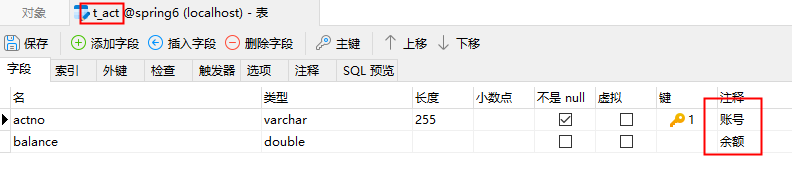
### 第一步:准备数据库表
表结构:
![[16.02-2.png]]
表数据:
![[16.02-3.png]]
### 第二步:创建包结构
- com. powernode. bank. pojo
- com. powernode. bank. service
- com. powernode. bank. service. impl
- com. powernode. bank. dao
- com. powernode. bank. dao. impl
### 第三步:准备 POJO 类
```Java
package com.powernode.bank.pojo;
/**
* @author 动力节点
* @version 1.0
* @className Account
* @since 1.0
**/
public class Account {
private String actno;
private Double balance;
@Override
public String toString() {
return "Account{" +
"actno='" + actno + '\'' +
", balance=" + balance +
'}';
}
public Account() {
}
public Account(String actno, Double balance) {
this.actno = actno;
this.balance = balance;
}
public String getActno() {
return actno;
}
public void setActno(String actno) {
this.actno = actno;
}
public Double getBalance() {
return balance;
}
public void setBalance(Double balance) {
this.balance = balance;
}
}
第四步:编写持久层
```Java title:AccountDao.java package com.powernode.bank.dao;
import com.powernode.bank.pojo.Account;
/** * @author 动力节点 * @version 1.0 * @className AccountDao * @since 1.0 **/ public interface AccountDao {
/**
 * 根据账号查询余额
 * @param actno
 * @return
 */
Account selectByActno(String actno);

/**
 * 更新账户
 * @param act
 * @return
 */
int update(Account act);
}
```Java title:AccountDaoImpl.java
package com.powernode.bank.dao.impl;

import com.powernode.bank.dao.AccountDao;
import com.powernode.bank.pojo.Account;
import jakarta.annotation.Resource;
import org.springframework.jdbc.core.BeanPropertyRowMapper;
import org.springframework.jdbc.core.JdbcTemplate;
import org.springframework.stereotype.Component;

/**
 * @author 动力节点
 * @version 1.0
 * @className AccountDaoImpl
 * @since 1.0
 **/
@Repository("accountDao")
public class AccountDaoImpl implements AccountDao {

    @Resource(name = "jdbcTemplate")
    private JdbcTemplate jdbcTemplate;

    @Override
    public Account selectByActno(String actno) {
        String sql = "select actno, balance from t_act where actno = ?";
        Account account = jdbcTemplate.queryForObject(sql, new BeanPropertyRowMapper<>(Account.class), actno);
        return account;
    }

    @Override
    public int update(Account act) {
        String sql = "update t_act set balance = ? where actno = ?";
        int count = jdbcTemplate.update(sql, act.getBalance(), act.getActno());
        return count;
    }
}
第五步:编写业务层
```Java title:AccountService.java package com.powernode.bank.service;
/** * @author 动力节点 * @version 1.0 * @className AccountService * @since 1.0 **/ public interface AccountService {
/**
 * 转账
 * @param fromActno
 * @param toActno
 * @param money
 */
void transfer(String fromActno, String toActno, double money);
}
```Java title:AccountServiceImpl.java
package com.powernode.bank.service.impl;

import com.powernode.bank.dao.AccountDao;
import com.powernode.bank.pojo.Account;
import com.powernode.bank.service.AccountService;
import jakarta.annotation.Resource;
import org.springframework.stereotype.Service;

/**
 * @author 动力节点
 * @version 1.0
 * @className AccountServiceImpl
 * @since 1.0
 **/
@Service("accountService")
public class AccountServiceImpl implements AccountService {

    @Resource(name = "accountDao")
    private AccountDao accountDao;

    @Override
    public void transfer(String fromActno, String toActno, double money) {
        // 查询账户余额是否充足
        Account fromAct = accountDao.selectByActno(fromActno);
        if (fromAct.getBalance() < money) {
            throw new RuntimeException("账户余额不足");
        }
        // 余额充足,开始转账
        Account toAct = accountDao.selectByActno(toActno);
        fromAct.setBalance(fromAct.getBalance() - money);
        toAct.setBalance(toAct.getBalance() + money);
        int count = accountDao.update(fromAct);
        count += accountDao.update(toAct);
        if (count != 2) {
            throw new RuntimeException("转账失败,请联系银行");
        }
    }
}
第六步:编写 Spring 配置文件
<?xml version="1.0" encoding="UTF-8"?>
<beans xmlns="http://www.springframework.org/schema/beans"
       xmlns:xsi="http://www.w3.org/2001/XMLSchema-instance"
       xmlns:context="http://www.springframework.org/schema/context"
       xsi:schemaLocation="http://www.springframework.org/schema/beans http://www.springframework.org/schema/beans/spring-beans.xsd
                           http://www.springframework.org/schema/context http://www.springframework.org/schema/context/spring-context.xsd">

    <context:component-scan base-package="com.powernode.bank"/>

    <bean id="dataSource" class="com.alibaba.druid.pool.DruidDataSource">
        <property name="driverClassName" value="com.mysql.cj.jdbc.Driver"/>
        <property name="url" value="jdbc:mysql://localhost:3306/spring6"/>
        <property name="username" value="root"/>
        <property name="password" value="root"/>
    </bean>

    <bean id="jdbcTemplate" class="org.springframework.jdbc.core.JdbcTemplate">
        <property name="dataSource" ref="dataSource"/>
    </bean>

</beans>
第七步:编写表示层(测试程序)
```Java title:BankTest.java package com.powernode.spring6.test;
import com.powernode.bank.service.AccountService; import org.junit.Test; import org.springframework.context.ApplicationContext; import org.springframework.context.support.ClassPathXmlApplicationContext;
/** * @author 动力节点 * @version 1.0 * @className BankTest * @since 1.0 **/ public class BankTest { @Test public void testTransfer(){ ApplicationContext applicationContext = new ClassPathXmlApplicationContext("spring.xml"); AccountService accountService = applicationContext.getBean("accountService", AccountService.class); try { accountService.transfer("act-001", "act-002", 10000); System.out.println("转账成功"); } catch (Exception e) { e.printStackTrace(); }
}
}
执行结果:
![[16.02-4.png]]
数据变化:
![[16.02-5.png]]

### 模拟异常

```Java title:AccountServiceImpl.java
package com.powernode.bank.service.impl;

import com.powernode.bank.dao.AccountDao;
import com.powernode.bank.pojo.Account;
import com.powernode.bank.service.AccountService;
import jakarta.annotation.Resource;
import org.springframework.stereotype.Service;

/\*\*
\* @author 动力节点
\* @version 1.0
\* @className AccountServiceImpl
\* @since 1.0
\*\*/
@Service("accountService")
public class AccountServiceImpl implements AccountService {

    @Resource(name = "accountDao")
    private AccountDao accountDao;

    @Override
    public void transfer(String fromActno, String toActno, double money) {
        // 查询账户余额是否充足
        Account fromAct = accountDao.selectByActno(fromActno);
        if (fromAct.getBalance() < money) {
            throw new RuntimeException("账户余额不足");
        }
        // 余额充足,开始转账
        Account toAct = accountDao.selectByActno(toActno);
        fromAct.setBalance(fromAct.getBalance() - money);
        toAct.setBalance(toAct.getBalance() + money);
        int count = accountDao.update(fromAct);

        // 模拟异常
        String s = null;
        s.toString();

        count += accountDao.update(toAct);
        if (count != 2) {
            throw new RuntimeException("转账失败,请联系银行");
        }
    }
}
执行结果: ![[16.02-6.png]]
数据库表中数据: ![[16.02-7.png]] 丢了 1 万。
16.3 Spring 对事务的支持
Spring 实现事务的两种方式
- 编程式事务
- 通过编写代码的方式来实现事务的管理。
- 声明式事务
- 基于注解方式
- 基于 XML 配置方式
Spring 事务管理 API
Spring 对事务的管理底层实现方式是基于 AOP 实现的。采用 AOP 的方式进行了封装。
所以 Spring 专门针对事务开发了一套 API,API 的核心接口如下:
![[16.03-1.png]]
PlatformTransactionManager 接口:Spring 事务管理器的核心接口。在 Spring 6 中它有两个实现:
- DataSourceTransactionManager:支持 JdbcTemplate、MyBatis、Hibernate 等事务管理。
- JtaTransactionManager:支持分布式事务管理。
如果要在 Spring 6 中使用 JdbcTemplate,就要使用 DataSourceTransactionManager 来管理事务。(Spring 内置写好了,可以直接用。)
声明式事务之注解实现方式
- 第一步:在 Spring 配置文件中配置事务管理器。
```xml title:Spring配置文件
- **第二步**:在 Spring 配置文件中引入 `tx` 命名空间。
```xml title:Spring配置文件
<?xml version="1.0" encoding="UTF-8"?>
<beans xmlns="http://www.springframework.org/schema/beans"
       xmlns:xsi="http://www.w3.org/2001/XMLSchema-instance"
       xmlns:context="http://www.springframework.org/schema/context"
       xmlns:tx="http://www.springframework.org/schema/tx"
       xsi:schemaLocation="http://www.springframework.org/schema/beans http://www.springframework.org/schema/beans/spring-beans.xsd
                           http://www.springframework.org/schema/context http://www.springframework.org/schema/context/spring-context.xsd
                           http://www.springframework.org/schema/tx http://www.springframework.org/schema/tx/spring-tx.xsd">
- 第三步:在 Spring 配置文件中配置“事务注解驱动器”,开启注解的方式控制事务。
```xml title:Spring配置文件
- **第四步**:在 `Service` 类上或方法上添加 `@Transactional` 注解
  在类上添加该注解,该类中所有的方法都有事务。在某个方法上添加该注解,表示只有这个方法使用事务。
```java title:AccountServiceImpl.java
package com.powernode.bank.service.impl;

import com.powernode.bank.dao.AccountDao;
import com.powernode.bank.pojo.Account;
import com.powernode.bank.service.AccountService;
import jakarta.annotation.Resource;
import org.springframework.stereotype.Service;
import org.springframework.transaction.annotation.Transactional;

/**
 * @author 动力节点
 * @version 1.0
 * @className AccountServiceImpl
 * @since 1.0
 */
@Service("accountService")
@Transactional
public class AccountServiceImpl implements AccountService {

    @Resource(name = "accountDao")
    private AccountDao accountDao;

    @Override
    public void transfer(String fromActno, String toActno, double money) {
        // 查询账户余额是否充足
        Account fromAct = accountDao.selectByActno(fromActno);
        if (fromAct.getBalance() < money) {
            throw new RuntimeException("账户余额不足");
        }
        // 余额充足,开始转账
        Account toAct = accountDao.selectByActno(toActno);
        fromAct.setBalance(fromAct.getBalance() - money);
        toAct.setBalance(toAct.getBalance() + money);
        int count = accountDao.update(fromAct);

        // 模拟异常
        String s = null;
        s.toString();

        count += accountDao.update(toAct);
        if (count != 2) {
            throw new RuntimeException("转账失败,请联系银行");
        }
    }
}
当前数据库表中的数据:
![[16.03-2.png]]
执行测试程序:
![[16.03-3.png]]
虽然出现异常了,再次查看数据库表中数据:
![[16.03-4.png]]
通过测试,发现数据没有变化,事务起作用了。
事务属性
事务属性包括哪些
![[16.03-5.png]]
事务中的重点属性:
- 事务传播行为
- 事务隔离级别
- 事务超时
- 只读事务
- 设置出现哪些异常回滚事务
- 设置出现哪些异常不回滚事务
事务传播行为
什么是事务的传播行为?
在
Service类中有a()方法和b()方法,a()方法上有事务,b()方法上也有事务,当a()方法执行过程中调用了b()方法,事务是如何传递的?合并到一个事务里?还是开启一个新的事务?这就是事务传播行为。
事务传播行为在 Spring 框架中被定义为枚举类型:
![[16.03-6.png]]
一共有七种传播行为:
- REQUIRED:支持当前事务,如果不存在就新建一个(默认)【没有就新建,有就加入】
- SUPPORTS:支持当前事务,如果当前没有事务,就以非事务方式执行【有就加入,没有就不管了】
- MANDATORY:必须运行在一个事务中,如果当前没有事务正在发生,将抛出一个异常【有就加入,没有就抛异常】
- REQUIRES_NEW:开启一个新的事务,如果一个事务已经存在,则将这个存在的事务挂起【不管有没有,直接开启一个新事务,开启的新事务和之前的事务不存在嵌套关系,之前事务被挂起】
- NOT_SUPPORTED:以非事务方式运行,如果有事务存在,挂起当前事务【不支持事务,存在就挂起】
- NEVER:以非事务方式运行,如果有事务存在,抛出异常【不支持事务,存在就抛异常】
- NESTED:如果当前正有一个事务在进行中,则该方法应当运行在一个嵌套式事务中。被嵌套的事务可以独立于外层事务进行提交或回滚。如果外层事务不存在,行为就像 REQUIRED 一样。【有事务的话,就在这个事务里再嵌套一个完全独立的事务,嵌套的事务可以独立的提交和回滚。没有事务就和 REQUIRED 一样。】
在代码中设置事务的传播行为:
```java title:设置事务传播行为
@Transactional(propagation = Propagation.REQUIRED)
可以编写程序测试一下传播行为:
```java title:测试事务传播行为1
@Transactional(propagation = Propagation.REQUIRED)
public void save(Account act) {
    // 这里调用dao的insert方法。
    accountDao.insert(act); // 保存act-003账户

    // 创建账户对象
    Account act2 = new Account("act-004", 1000.0);
    try {
        accountService.save(act2); // 保存act-004账户
    } catch (Exception e) {
    }
    // 继续往后进行我当前1号事务自己的事儿。
}
```java title:测试事务传播行为2 @Override //@Transactional(propagation = Propagation.REQUIRED) @Transactional(propagation = Propagation.REQUIRES_NEW) public void save(Account act) { accountDao.insert(act); // 模拟异常 String s = null; s.toString();
// 事儿没有处理完,这个大括号当中的后续也许还有其他的DML语句。
}
``

一定要集成
Log4j2` 日志框架,在日志信息中可以看到更加详细的信息。
事务隔离级别
事务隔离级别类似于教室 A 和教室 B 之间的那道墙,隔离级别越高表示墙体越厚。隔音效果越好。
数据库中读取数据存在的三大问题:(三大读问题)
- 脏读:读取到没有提交到数据库的数据,叫做脏读。
- 不可重复读:在同一个事务当中,第一次和第二次读取的数据不一样。
- 幻读:读到的数据是假的。
事务隔离级别包括四个级别:
- 读未提交:READ_UNCOMMITTED
- 这种隔离级别,存在脏读问题,所谓的脏读(dirty read)表示能够读取到其它事务未提交的数据。
- 读提交:READ_COMMITTED
- 解决了脏读问题,其它事务提交之后才能读到,但存在不可重复读问题。
- 可重复读:REPEATABLE_READ
- 解决了不可重复读,可以达到可重复读效果,只要当前事务不结束,读取到的数据一直都是一样的。但存在幻读问题。
- 序列化:SERIALIZABLE
- 解决了幻读问题,事务排队执行。不支持并发。
大家可以通过一个表格来记忆:
| 隔离级别 | 脏读 | 不可重复读 | 幻读 |
|----------------|------|------------|------|
| 读未提交 | 有 | 有 | 有 |
| 读提交 | 无 | 有 | 有 |
| 可重复读 | 无 | 无 | 有 |
| 序列化 | 无 | 无 | 无 |
在 Spring 代码中如何设置隔离级别?
隔离级别在 Spring 中以枚举类型存在:
![[16.03-7.png]]
java title:设置事务隔离级别
@Transactional(isolation = Isolation.READ_COMMITTED)
测试事务隔离级别:READ_UNCOMMITTED 和 READ_COMMITTED
怎么测试:一个 Service 负责插入,一个 Service 负责查询。负责插入的 Service 要模拟延迟。
```java title:IsolationService1.java
package com.powernode.bank.service.impl;
import com.powernode.bank.dao.AccountDao; import com.powernode.bank.pojo.Account; import jakarta.annotation.Resource; import org.springframework.stereotype.Service; import org.springframework.transaction.annotation.Isolation; import org.springframework.transaction.annotation.Transactional;
/** * @author 动力节点 * @version 1.0 * @className IsolationService1 * @since 1.0 */ @Service("i1") public class IsolationService1 {
@Resource(name = "accountDao")
private AccountDao accountDao;

// 1号
// 负责查询
// 当前事务可以读取到别的事务没有提交的数据。
//@Transactional(isolation = Isolation.READ_UNCOMMITTED)
// 对方事务提交之后的数据我才能读取到。
@Transactional(isolation = Isolation.READ_COMMITTED)
public void getByActno(String actno) {
    Account account = accountDao.selectByActno(actno);
    System.out.println("查询到的账户信息:" + account);
}
}
java title:IsolationService2.java
package com.powernode.bank.service.impl;
import com.powernode.bank.dao.AccountDao;
import com.powernode.bank.pojo.Account;
import jakarta.annotation.Resource;
import org.springframework.stereotype.Service;
import org.springframework.transaction.annotation.Transactional;
/**
* @author 动力节点
* @version 1.0
* @className IsolationService2
* @since 1.0
*/
@Service("i2")
public class IsolationService2 {
@Resource(name = "accountDao")
private AccountDao accountDao;
// 2号
// 负责insert
@Transactional
public void save(Account act) {
accountDao.insert(act);
// 睡眠一会
try {
Thread.sleep(1000 * 20);
} catch (InterruptedException e) {
e.printStackTrace();
}
}
}
```
测试程序
```java title:测试程序
@Test
public void testIsolation1() {
ApplicationContext applicationContext = new ClassPathXmlApplicationContext("spring.xml");
IsolationService1 i1 = applicationContext.getBean("i1", IsolationService1.class);
i1.getByActno("act-004");
}
@Test public void testIsolation2() { ApplicationContext applicationContext = new ClassPathXmlApplicationContext("spring.xml"); IsolationService2 i2 = applicationContext.getBean("i2", IsolationService2.class); Account act = new Account("act-004", 1000.0); i2.save(act); }
以上代码表示设置事务的超时时间为 10 秒。
表示超过 10 秒如果该事务中所有的 DML 语句还没有执行完毕的话,最终结果会选择回滚。
默认值-1,表示没有时间限制。
这里有个坑,事务的超时时间指的是哪段时间?
在当前事务当中,最后一条 DML 语句执行之前的时间。
如果最后一条 DML 语句后面很有很多业务逻辑,这些业务代码执行的时间不被计入超时时间。
```java title:事务超时示例1 @Transactional(timeout = 10) // 设置事务超时时间为10秒。 public void save(Account act) { accountDao.insert(act); // 睡眠一会 try { Thread.sleep(1000 * 15); } catch (InterruptedException e) { e.printStackTrace(); } }
```java title:事务超时示例2
@Transactional(timeout = 10) // 设置事务超时时间为10秒。
public void save(Account act) {
    // 睡眠一会
    try {
        Thread.sleep(1000 * 15);
    } catch (InterruptedException e) {
        e.printStackTrace();
    }
    accountDao.insert(act);
}
当然,如果想让整个方法的所有代码都计入超时时间的话,可以在方法最后一行添加一行无关紧要的 DML 语句。
只读事务
代码如下:
```java title:设置只读事务
@Transactional(readOnly = true)
将当前事务设置为只读事务,在该事务执行过程中只允许 `select` 语句执行,`delete`、`insert`、`update` 均不可执行。

该特性的作用是:启动 Spring 的优化策略。提高 `select` 语句执行效率。
如果该事务中确实没有增删改操作,建议设置为只读事务。

#### 设置哪些异常回滚事务

代码如下:
```java title:设置回滚异常
@Transactional(rollbackFor = RuntimeException.class)
表示只有发生 RuntimeException 异常或该异常的子类异常才回滚。
设置哪些异常不回滚事务
代码如下:
```java title:设置不回滚异常
@Transactional(noRollbackFor = NullPointerException.class)
表示发生 `NullPointerException` 或该异常的子类异常不回滚,其他异常则回滚。

### 事务的全注解式开发

编写一个类来代替配置文件,代码如下:
```java title:Spring6Config.java
package com.powernode.bank;

import com.alibaba.druid.pool.DruidDataSource;
import org.springframework.context.annotation.Bean;
import org.springframework.context.annotation.ComponentScan;
import org.springframework.context.annotation.Configuration;
import org.springframework.jdbc.core.JdbcTemplate;
import org.springframework.jdbc.datasource.DataSourceTransactionManager;
import org.springframework.transaction.annotation.EnableTransactionManagement;

import javax.sql.DataSource;

/**
 * @author 动力节点
 * @version 1.0
 * @className Spring6Config
 * @since 1.0
 */
@Configuration
@ComponentScan("com.powernode.bank")
@EnableTransactionManagement
public class Spring6Config {

    @Bean
    public DataSource getDataSource() {
        DruidDataSource dataSource = new DruidDataSource();
        dataSourceagini.setDriverClassName("com.mysql.cj.jdbc.Driver");
        dataSource.setUrl("jdbc:mysql://localhost:3306/spring6");
        dataSource.setUsername("root");
        dataSource.setPassword("root");
        return dataSource;
    }

    @Bean(name = "jdbcTemplate")
    public JdbcTemplate getJdbcTemplate(DataSource dataSource) {
        JdbcTemplate jdbcTemplate = new JdbcTemplate();
        jdbcTemplate.setDataSource(dataSource);
        return jdbcTemplate;
    }

    @Bean
    public DataSourceTransactionManager getDataSourceTransactionManager(DataSource dataSource) {
        DataSourceTransactionManager dataSourceTransactionManager = new DataSourceTransactionManager();
        dataSourceTransactionManager.setDataSource(dataSource);
        return dataSourceTransactionManager;
    }
}
测试程序如下:
```java title:测试全注解式开发
@Test
public void testNoXml() {
ApplicationContext applicationContext = new AnnotationConfigApplicationContext(Spring6Config.class);
AccountService accountService = applicationContext.getBean("accountService", AccountService.class);
try {
accountService.transfer("act-001", "act-002", 10000);
System.out.println("转账成功");
} catch (Exception e) {
e.printStackTrace();
}
}
执行结果:
![[16.03-8.png]]

数据库表中数据:
![[16.03-9.png]]

### 声明式事务之 XML 实现方式

配置步骤:
- **第一步**:配置事务管理器
- **第二步**:配置通知
- **第三步**:配置切面

记得添加 `aspectj` 的依赖:
```xml title:Maven依赖
<dependency>
    <groupId>org.springframework</groupId>
    <artifactId>spring-aspects</artifactId>
    <version>6.0.0-M2</version>
</dependency>
Spring 配置文件如下:
记得添加 aop 的命名空间。
```xml title:Spring配置文件
<!-- 配置通知 -->
<tx:advice id="txAdvice" transaction-manager="transactionManager">
    <tx:attributes>
        <tx:method name="*" propagation="REQUIRED"/>
    </tx:attributes>
</tx:advice>

<!-- 配置切面 -->
<aop:config>
    <aop:pointcut id="pt" expression="execution(* com.powernode.bank.service..*.*(..))"/>
    <aop:advisor advice-ref="txAdvice" pointcut-ref="pt"/>
</aop:config>
将 `AccountServiceImpl` 类上的 `@Transactional` 注解删除。

编写测试程序:
java title:测试XML配置
@Test
public void testTransferXml() {
ApplicationContext applicationContext = new ClassPathXmlApplicationContext("spring2.xml");
AccountService accountService = applicationContext.getBean("accountService", AccountService.class);
try {
accountregardingService.transfer("act-001", "act-002", 10000);
System.out.println("转账成功");
} catch (Exception e) {
e.printStackTrace();
}
}
```
执行结果:
![[16.03-10.png]]
数据库表中记录:
![[16.03-11.png]]
通过测试可以看到配置 XML 已经起作用了。